Hi, folks,
Spectrum recently switched to the High Split system in my area and I've had problems ever since. The Spectrum tech was here for three hours today and their support team is saying that my two HDHomeRun Prime devices aren't working correctly with the Spectrum High Split converters.
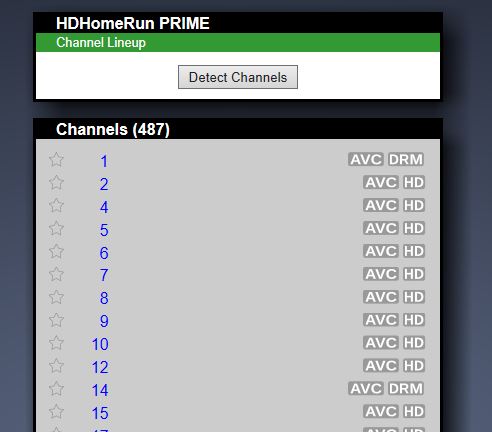
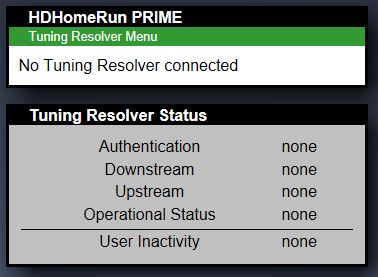
The channels will be there for a couple of days, then they'll disappear for a couple of days. When the channels disappear, the "Detect Channels" button on the Prime's "Channel Lineup" page is gone, also. However, if I pull the power from the Spectrum High Split converter, the channels show back up, but most of them don't work. If I then power up the converter, the channels disappear as soon as the converter's blue light goes from blinking to solid.
Is there anyone else here having (or has had) this problem, too? Thanks.
Mike
HDHomeRun Prime & Spectrum High Split converter problem
Re: HDHomeRun Prime & Spectrum High Split converter problem
If there are no Detect Channels button it means the Tuning Adapter has told the HDHomeRun there are no channels.
I can double check - can you please enable "send diagnostic information" in the HDHomeRun app settings menu then reply back with the Device ID.
I can double check - can you please enable "send diagnostic information" in the HDHomeRun app settings menu then reply back with the Device ID.
Re: HDHomeRun Prime & Spectrum High Split converter problem
Device ID: 131DB86A
Thanks.
Thanks.
Re: HDHomeRun Prime & Spectrum High Split converter problem
The second device ID is: 131D990F
Thanks.
Thanks.
-
leerandall
- Posts: 1010
- Joined: Sat Mar 16, 2013 5:49 pm
- Device ID: 131102D9, 1326E147
- x 5
Re: HDHomeRun Prime & Spectrum High Split converter problem
If I remember correctly with my Spectrum HSCs, I had to go into the web pages of the HSC, go to the page that shows the channels you're subscribed to, and reload the list from that page. I'm sorry I can't give any more details because I returned all my Spectrum equipment, including my cablecards and cancelled my service (boy, that felt good) after they jacked up my monthly bill to $368/mo. That was for cable, internet, and VoIP phone service. Luckily, at the same time I got that bill, Ezee Fiber had just finished pulling fiber in my subdivision and I jumped at a symmetrical 2Gbps internet plan for about $75/mo that was $25 per month cheaper than the Spectrum 300Mbps down/10Mbps up service I had. I then got Youtube TV to replace cable for about $90/mo, and I transferred the Spectrum VoIP phone number to my cell phone as a second line for $10/mo.
Good luck with your HSCs and Spectrum.
Good luck with your HSCs and Spectrum.
-
KeithAbbott
- Posts: 191
- Joined: Fri Mar 11, 2011 7:10 pm
- x 11
Re: HDHomeRun Prime & Spectrum High Split converter problem
To the OP, I feel your pain. I am a Spectrum customer in SE Michigan, they swapped out my tuning adapter last year for a Vecima HSC-1-H High-Split Converter. Spent about a half-day in my basement with the Spectrum technician, who eventually was successful working with phone support to get everything working. The onsite technician ultimately did nothing; the changes that were needed to make everything work were all done by level 3 phone support. I think the only reason that they insist on sending a tech onsite is that they don't believe what the customer is telling them over the phone. I am fairly certain that I am more proficient with the technology than the techs that show up at my door.
Anyhow, in response to the previous post, I don't think there is a web page for the HSC. There is no ethernet or wifi connectivity available on the HSC; only an upstream connection to the cableco coax, and a downstream coax and USB connection to the Prime.
If I had to guess, I think Spectrum is somehow losing the channel provisioning (on their end) assigned to your devices. Although I'm sure they will blame your Prime(s) as the root cause of the problem.
Anyhow, in response to the previous post, I don't think there is a web page for the HSC. There is no ethernet or wifi connectivity available on the HSC; only an upstream connection to the cableco coax, and a downstream coax and USB connection to the Prime.
If I had to guess, I think Spectrum is somehow losing the channel provisioning (on their end) assigned to your devices. Although I'm sure they will blame your Prime(s) as the root cause of the problem.
-
leerandall
- Posts: 1010
- Joined: Sat Mar 16, 2013 5:49 pm
- Device ID: 131102D9, 1326E147
- x 5
Re: HDHomeRun Prime & Spectrum High Split converter problem
There is a USB connection between the Prime and the HSC. And if you click on the Tuning Adapter link from the Prime's web page, it will bring up a series of HSC web pages. I'm fairly certain of this. I had similar problems to the OP when I installed my 2 HSCs. One of them had the proper line-up and one of them didn't. It was these HSC web pages that showed me the line-ups so I could see the difference. BTW, I too am in southeast Michigan, in a western suburb of Detroit.
-
KeithAbbott
- Posts: 191
- Joined: Fri Mar 11, 2011 7:10 pm
- x 11
Re: HDHomeRun Prime & Spectrum High Split converter problem
I stand corrected, Lee is correct. I had forgotten about that capability from within the Prime's web page. Those web pages might be helpful to solve the mystery, either by himself or standing next to an onsite tech.leerandall wrote: Tue Jun 09, 2026 2:17 pm There is a USB connection between the Prime and the HSC. And if you click on the Tuning Adapter link from the Prime's web page, it will bring up a series of HSC web pages. I'm fairly certain of this. I had similar problems to the OP when I installed my 2 HSCs. One of them had the proper line-up and one of them didn't. It was these HSC web pages that showed me the line-ups so I could see the difference.
Re: HDHomeRun Prime & Spectrum High Split converter problem
I've been busy the last couple of months getting my new small business up and running and haven't had time to work on this problem. However, most of the time, we've had at least one of the Primes working, until now. This may be a coincidence, but a couple of nights ago, we had a bad thunderstorm come through the area and it knocked out the power for a few minutes. Spectrum sent us a text message saying that service was out in our area. After everything came back online, we've only been able to tune to channels that don't require the converter. Thanks.
Re: HDHomeRun Prime & Spectrum High Split converter problem
I just discovered that if I disconnect the Spectrum cable from the converter, the Prime then sees the converter.
Re: HDHomeRun Prime & Spectrum High Split converter problem
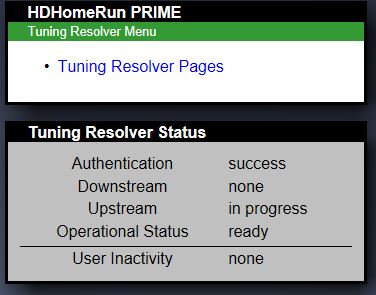
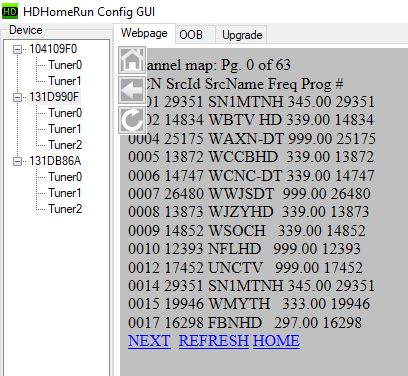
Now, the Prime sees the converter with the converter connected to the Spectrum cable. Also, the converter shows the correct channel map, but the Prime isn't getting it.
-
KeithAbbott
- Posts: 191
- Joined: Fri Mar 11, 2011 7:10 pm
- x 11
Re: HDHomeRun Prime & Spectrum High Split converter problem
When you say "the Prime isn't getting it", that's after you click the "Detect Channels" button on the Channel Lineup screen, right?
Re: HDHomeRun Prime & Spectrum High Split converter problem
That's right, Keith. In the Tuning Resolver menu, the Spectrum converter (or tuning adapter) shows the almost 500 channels that I'm supposed to get, but the Prime only finds 137 channels after a scan. I even connected the Prime directly to the cable and unplugged the USB connection to the converter, ran a channel scan, and got the same 137 channels.
Re: HDHomeRun Prime & Spectrum High Split converter problem
I just spoke with a SiliconDust tech on the phone and we both thinks it's a problem on Spectrum's end or bad converters. Also, he asked me to turn the diagnostics recording back on, so I did that on Device ID 131D990F. Thanks.
Re: HDHomeRun Prime & Spectrum High Split converter problem
Consistently inconsistent. I ran another channel scan on one of the Primes and it found all 487 of the channels that I'm supposed to get. The scan took about an hour and a half. I'm getting too old for this.