
There's a station (or two actually along with about 8 sub-channels on each) that is apparently on the edge of detection when scanning.
My regular TVs scan and find the channels, though sometimes the poor reception makes it hard to watch.
In Portland, OR. Virtual channels 29 and 41.
29 showed up before, but since recently re-scanning it never shows up but now 41 is showing up.
I think the broadcasters changed the power used for transmission or such, as another nearby station that had reception issues now works fine.
Is there a way to manually add channels to the HDHomeRun, so I can try to use them via HDHomeRun?
I have:
Model: HDFX-2US
Device ID: 1096DBB4
Firmware: 20260326
Thanks ...
Manually adding channels
Re: Manually adding channels
Based on the scan data from your device, 29 is not transmitting a TVCT, which is the bit of data that tells the receiver the channel names and numbers. We know the company that operates that station as they contact us regularly about updating the guide listings, so I just sent them an email asking them to have their engineers check the equipment that inserts that data.
41 is just coming in very weak, which is a bit unusual because it should be about as strong as 29, if not stronger. What kind of antenna are you using?
41 is just coming in very weak, which is a bit unusual because it should be about as strong as 29, if not stronger. What kind of antenna are you using?
Re: Manually adding channels
I have an outdoor antennae in my attic, and am very close to the transmitters - they are about 2 miles away - but there is a hill somewhat in the way (in the west hills of Portland).jasonl wrote: Wed Sep 09, 2026 3:57 pm Based on the scan data from your device, 29 is not transmitting a TVCT, which is the bit of data that tells the receiver the channel names and numbers. We know the company that operates that station as they contact us regularly about updating the guide listings, so I just sent them an email asking them to have their engineers check the equipment that inserts that data.
41 is just coming in very weak, which is a bit unusual because it should be about as strong as 29, if not stronger. What kind of antenna are you using?
Re: Manually adding channels
It's already showing up again, thanks!
If you have any tips for me with the attic antennae let me know - like putting some kind of limiter on it or such, as I think interference is a bigger issue than signal strength.
If you have any tips for me with the attic antennae let me know - like putting some kind of limiter on it or such, as I think interference is a bigger issue than signal strength.
Re: Manually adding channels
Thanks, they did get back to us that 29 should now be fully operational. Very nice to work with broadcasters like that.
Do you know the model of the antenna or have a link to it? Some models have very inconsistent performance on the lowest UHF channels, and 41.x is on one of those. Some of them can be helped by applying a bit of aluminum foil in appropriate locations.
Do you know the model of the antenna or have a link to it? Some models have very inconsistent performance on the lowest UHF channels, and 41.x is on one of those. Some of them can be helped by applying a bit of aluminum foil in appropriate locations.
Re: Manually adding channels
Antenna is an RCA Yagi not sure of the model number this one on Amazon:jasonl wrote: Wed Sep 09, 2026 6:14 pm Thanks, they did get back to us that 29 should now be fully operational. Very nice to work with broadcasters like that.
Do you know the model of the antenna or have a link to it? Some models have very inconsistent performance on the lowest UHF channels, and 41.x is on one of those. Some of them can be helped by applying a bit of aluminum foil in appropriate locations.
https://www.amazon.com/dp/B0024R4B5C
Re: Manually adding channels
Is it the original model that has the loop-style elements where the transformer attaches:
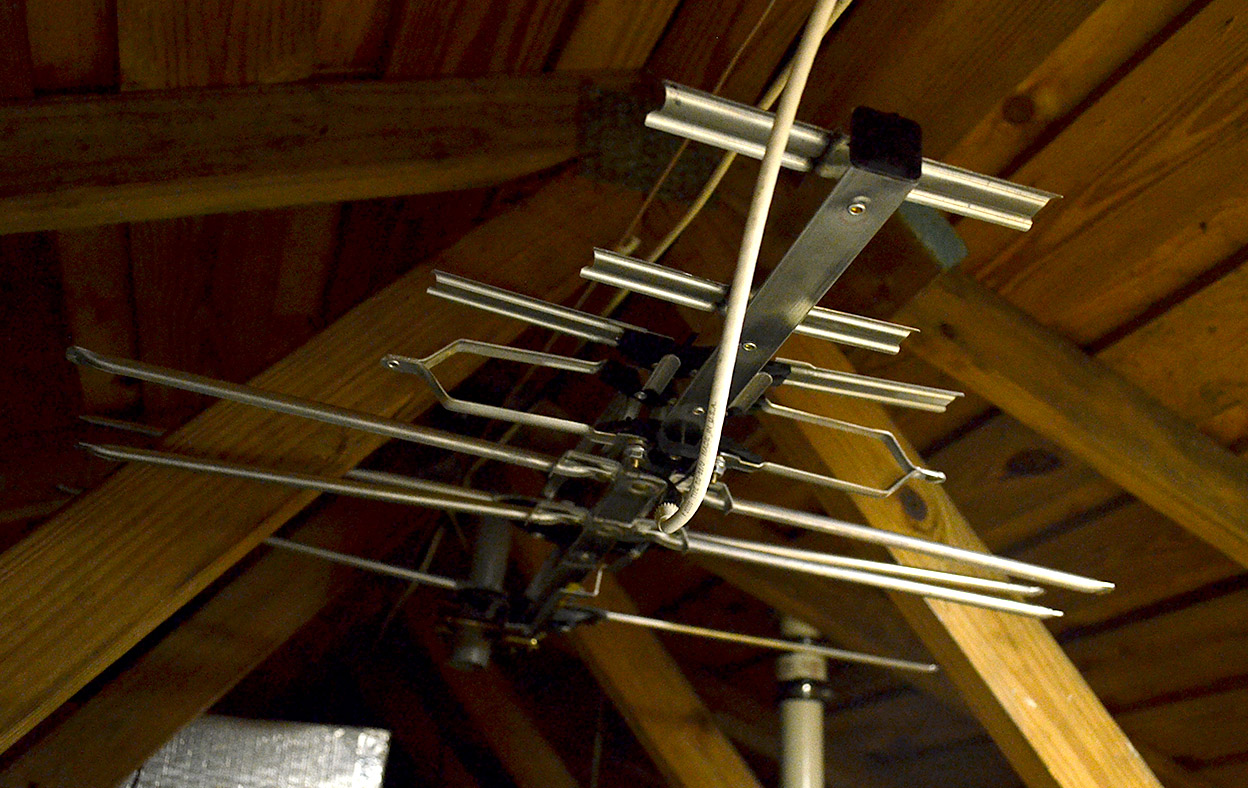
Or the newer model that just has the blades:

If it's the newer model, is it in a place in your attic where you can get at it without too much trouble? If so, can you measure the length tip to tip of one of the front set of 3 directors, the length tip to tip of the larger UHF driven element (the blades where the transformer attaches), and then also you can't see it in the picture above, but the thin wires that connect the UHF and VHF parts of the antenna continue past that black plastic part in the middle towards the back of the antenna and just kind of float there in space. How long is the part of those wires between the floating end and the screw in the middle?
Or the newer model that just has the blades:
If it's the newer model, is it in a place in your attic where you can get at it without too much trouble? If so, can you measure the length tip to tip of one of the front set of 3 directors, the length tip to tip of the larger UHF driven element (the blades where the transformer attaches), and then also you can't see it in the picture above, but the thin wires that connect the UHF and VHF parts of the antenna continue past that black plastic part in the middle towards the back of the antenna and just kind of float there in space. How long is the part of those wires between the floating end and the screw in the middle?